OpenAlex⚓︎
Importing from OpenAlex⚓︎
You can access our self-hosted OpenAlex instances (Solr and Postgres) directly. For more information on how to write queries, please consult the respective page in the document.
You can use the Solr full-text search via the platform:
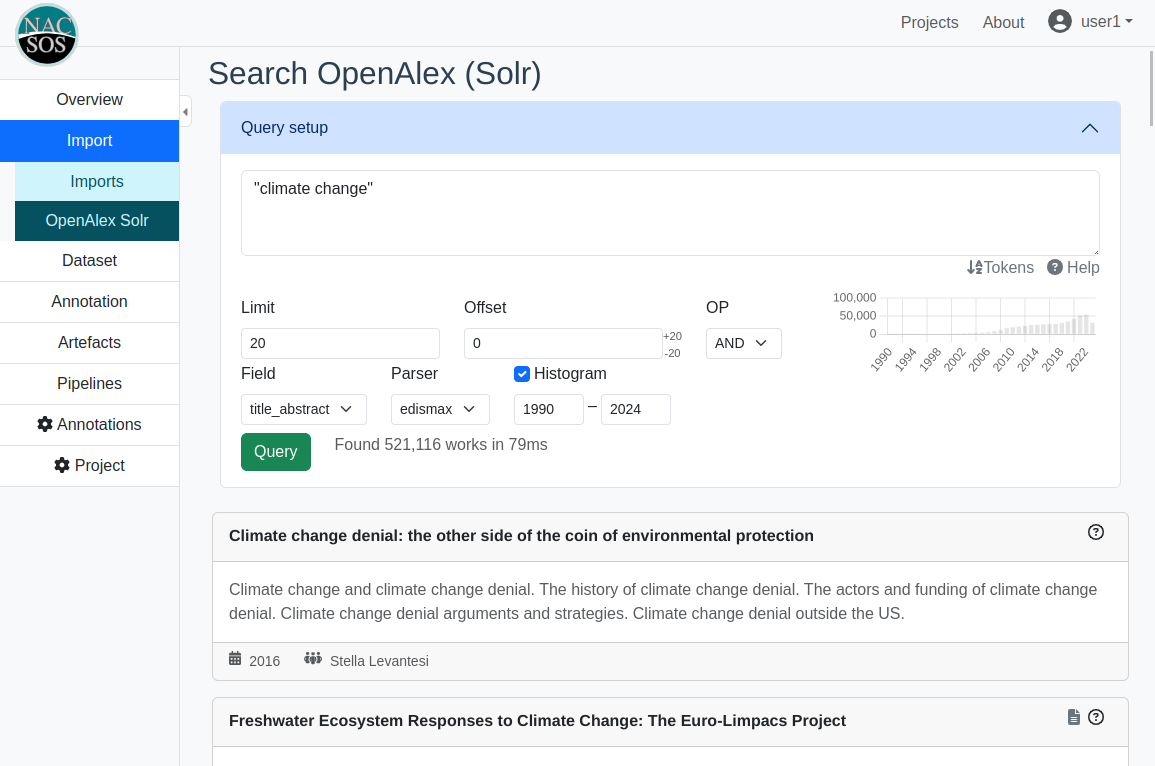
Unless you know exactly what the settings mean, just use the defaults. The +20/-20 next to the "Offset" field is effectively the pagination, but it does not work well for high page counts. You can get a histogram (number of papers per year) by checking the box and clicking "Query".
Sometimes, there might be an error after 30s. This means, that the query was cancelled because it was too slow. You may try it once or twice more and get lucky.
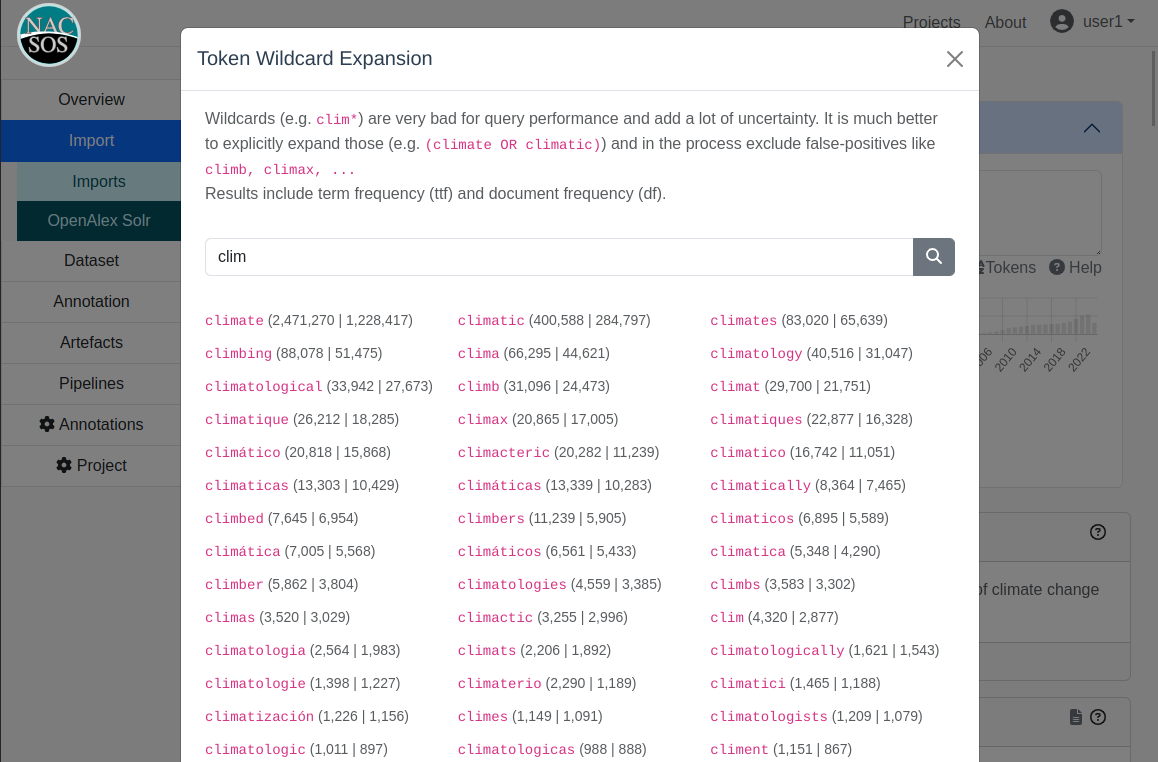
As mentioned in the below, it is always best practice to avoid wildcard queries and instead use an explicit OR clause.
By clicking on "Tokens" under the query box, you get a small tool to find candidates for a postfix-wildcard.
Snapshot improvements⚓︎
OpenAlex is under attack by publishers that raise copyright claims on abstracts. Abstracts are critical for us to even search, so we try to improve our local copy.
Abstracts that were fixed:
- Abstracts from some old nacsos projects on CDR and climate and health
- Difference from old snapshot from end of 2024
- Climate and health "superquery" attempts under the assumption that we'd at least get records that should match through the API (and trying to fix those that came back without an abstracts via scopus and web of science, early 2025)
- Drawing a random sample of 1M (excluding xpac) from our latest snapshot copy (around April 2026) and for those with missing abstracts, trying to fix via dimensions, WoS, scopus, pubmed (via this)
Overall, this adds around 30M abstracts to our snapshot. You can check that by looking at the abstract_source field in the solr responses (see here).
It's not the actual count because some data might be duplicate or the OpenAlex ID was deprecated, but here's a count of the metadata cache database
| wrapper | n_total | n_missing_oa_id | n_has_abs | n_has_doi | n_no_doi | n_has_abs_no_doi |
|---|---|---|---|---|---|---|
| DIMENSIONS | 1558783 | 116 | 62533 | 1558783 | 0 | 0 |
| NACSOS | 4825212 | 0 | 4825212 | 3971485 | 853727 | 853727 |
| OpenAlex_old | 21804650 | 0 | 21804650 | 0 | 21804650 | 21804650 |
| PUBMED | 1259621 | 15279 | 43616 | 1259261 | 360 | 338 |
| SCOPUS | 99009 | 519 | 7292 | 99009 | 0 | 0 |
| WOS | 43469 | 1704 | 2521 | 42837 | 632 | 76 |
Searching other fields (not just title_abstract)⚓︎
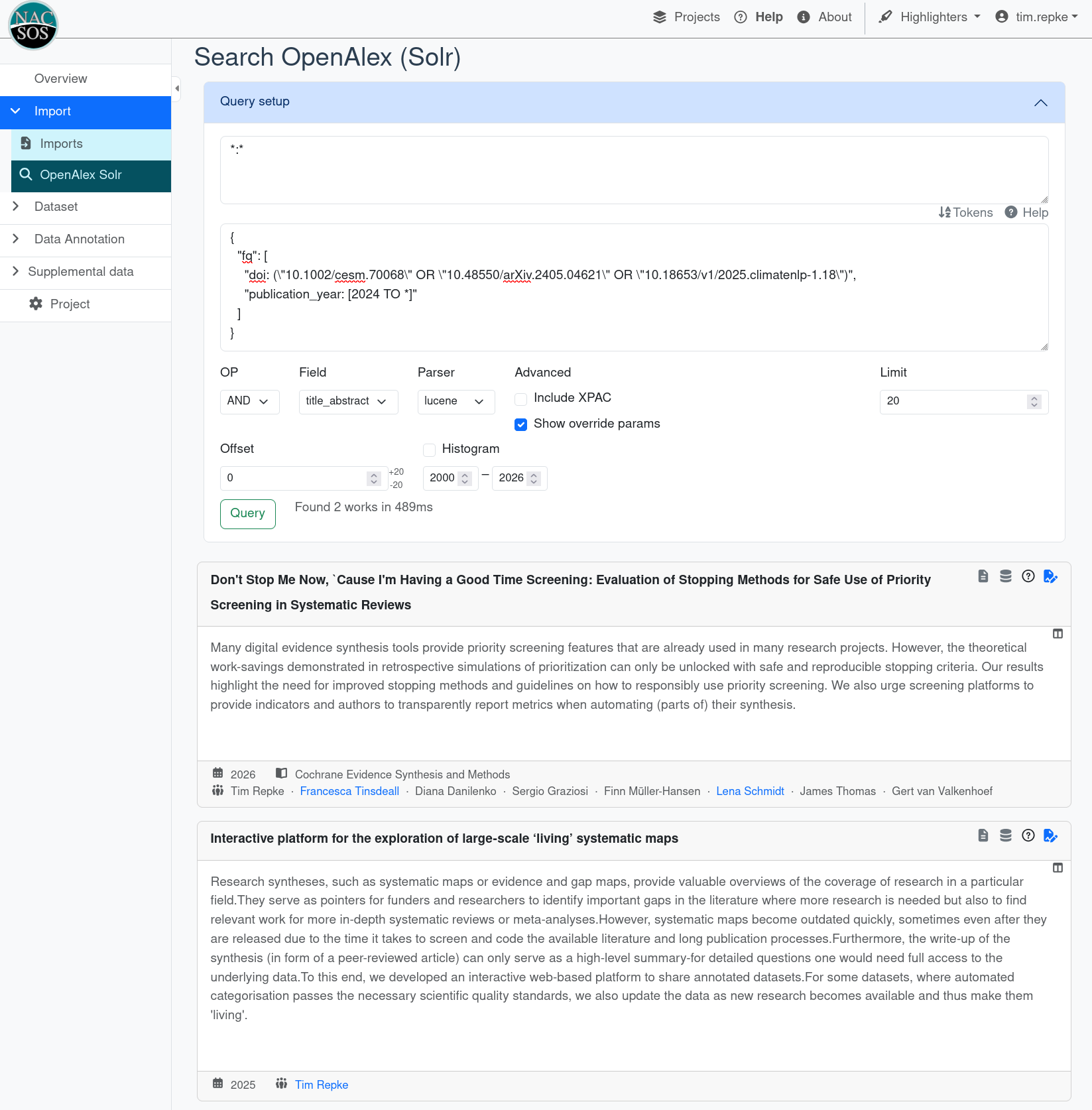
Solr has what's called "filter queries (fq)". You can change these directly through the UI, for example when searching for DOIs. If you want to combine multiple filter queries, this becomes a list of strings. Note, that strings should be in double quotes which need to be escaped in this json string.
This example searches for a list of DOIs and additionally filters for publication year including and after 2024:
{
  "fq": [
    "doi: (\"10.1002/cesm.70068\" OR \"10.48550/arXiv.2405.04621\" OR \"10.18653/v1/2025.climatenlp-1.18\")",
    "publication_year: [2024 TO *]"
  ]
}
Notes and caveats:
- Note, that even if you have no query for the text field, at least add
*:*, otherwise it won't work. abstract:*means "Works with abstract" and-abstract:*the opposite.- Be aware that some fields may be empty on some records and thus be missing in a filter.
- You cannot search "within" fields other than
titleandtitle_abstractas these are indexed as "keywords" (as is). This is particularly relevant for the json-formatted fields, meaning, for example, you can't search for authors. - Some combinations of filters cause the query to slow down considerably. Unless you absolutely need it, avoid doing that.
- If a query times out, you may try it again a little later. Given solr caches intermediate results, it might then finish in time. If it does not work after one or two retries, stop retrying!
Solr⚓︎
As per direct import of OpenAlex into NACSOS: please use this responsibly, as wrong settings may cause you to import millions of documents into the NACSOS database.
Common pitfalls to look out for
- Make sure to select the field you want to query (either within the query or set
df). - Make sure to select the correct query parser. Typically,
defType=luceneworks fine, for complex queries it is required. - Make sure to set
q.op=AND, this is typically what you want for boolean queries.
Wildcards⚓︎
- The wildcard character
?matches any single character. - The wildcard character
*matches zero or more sequential characters, and can be placed in the middle of a word. - Note, that it is always better to rather spell out the explicit matches rather than using wildcards. It may help to look at the solr index to see what the wildcard would match.
Querying multiple fields⚓︎
To query multiple fields (e.g. title and abstract), change defType to
edismax, set qf to a space separated list of fields, e.g.
this example.
Near operators⚓︎
Using The eDisMax mode (necessary to query multiple fields) you can search for terms that occur close to each other
For example, "GHG emissions"~3 will find results where "GHG" and "emissions" occur within 3 positions of each other.
However, you cannot use wildcards, or combine terms. For that, you need...
Complex Phrase or Surrounding Parser⚓︎
These can be used to create more complex queries in conjunction with the NEAR operator. For example:
With the complex phrase parser
{!complexphrase inOrder=false df=title}"(co2 OR GHG) emissio*"~5 NOT "co2 emission*" NOT "GHG emission*"
Similarly, with the surrounding parser.
Nwill match unordered,Worderedclimate W changeshould be used instead of"climate change"climate 3N chang*could matchclimate changebut alsochanging in the climate
These things can also be mixed with standard queries:
("dissonance" OR tariff* OR "time-varying pricing") AND ({!surround v="(energy OR electric) 15W (consumption OR conservation)"} OR "price responsiveness")
For complex queries, you have to unset the defType (pick ----- or lucene) and set the default query field (df) to title_abstract (or whatever field you like to search).
Here is an example query
If you use any of these {! ...} queries, you need to set the parser (aka defType) to lucene.
Faceting⚓︎
Documentation here. Facets are just like filters in online shops, where you get a side panel to filter by price, brand or size. The facet is only providing the statistics of what and how much of something is there, it does not actually filter.
It is great for getting distribution over time of publications by adding the following query parameters to the URL:
facet=true
facet.range=publication_year
facet.range.start=1990
facet.range.end=2024
facet.range.gap=1
facet.sort=index
Easier and giving you full coverage:
facet=true
facet.field=publication_year
facet.sort=index
Tips, pitfalls and notes for translating WoS or Scopus queries to Solr⚓︎
- Make sure that parentheses are properly applied:
WoS querying assumes implicit parentheses in combinations of the boolean operators
ANDandOR(see here), e.g.copper OR lead AND algaeis implicitly searches ascopper OR (lead AND algae). In Solr, the behavior is different:copper OR lead AND algaeonly gives results matchinglead AND algae. - When translating queries, it is essential to test independent parts separately.
Solr may return results even in case a part of the query is not correctly structured.
For example, using the near operator
3Nwithout the proper parser{!surround v=''}will not raise an error but look for3Nas a token and therefore will return no results for this part of the query. - Near operators:
NEAR/xin WoS needs to be translated to(x+1)N. In WoS, thexindicates the maximal number of words between the two terms, while in Solr it indicates the number of steps between - Concatenated near operators:
{!surround v='(soil 3N carbon 3N sequestration)'}is internally treated as{!surround v='((soil 3N carbon) 3N sequestration)'}while{!surround v='(soil 3N (carbon 3N sequestration))'}may return slightly different results (same behavior as in WoS). - Internally, the querying works with indices that are built on tokens.
This
tool can be used to test how a query matches internally (click
Analysisin the Solr menu).
Helper for making wildcards explicit⚓︎
You may run into an error similar to "too many subqueries".
This is usually due to the fact that Solr will expand wildcards before executing the query.
For example, if you search for "NACSOS AND rock*", Solr will look at all words it knows about and create a query like this:
"NACSOS AND (rock OR rocks OR rocking OR rocker OR ...)".
This list can be massive, hence the limit to prevent overloading.
Also for your own sanity, it might be good to make wildcards explicit.
Knowing what Solr knows is helping with this.
The /terms Component with prefix search will help.
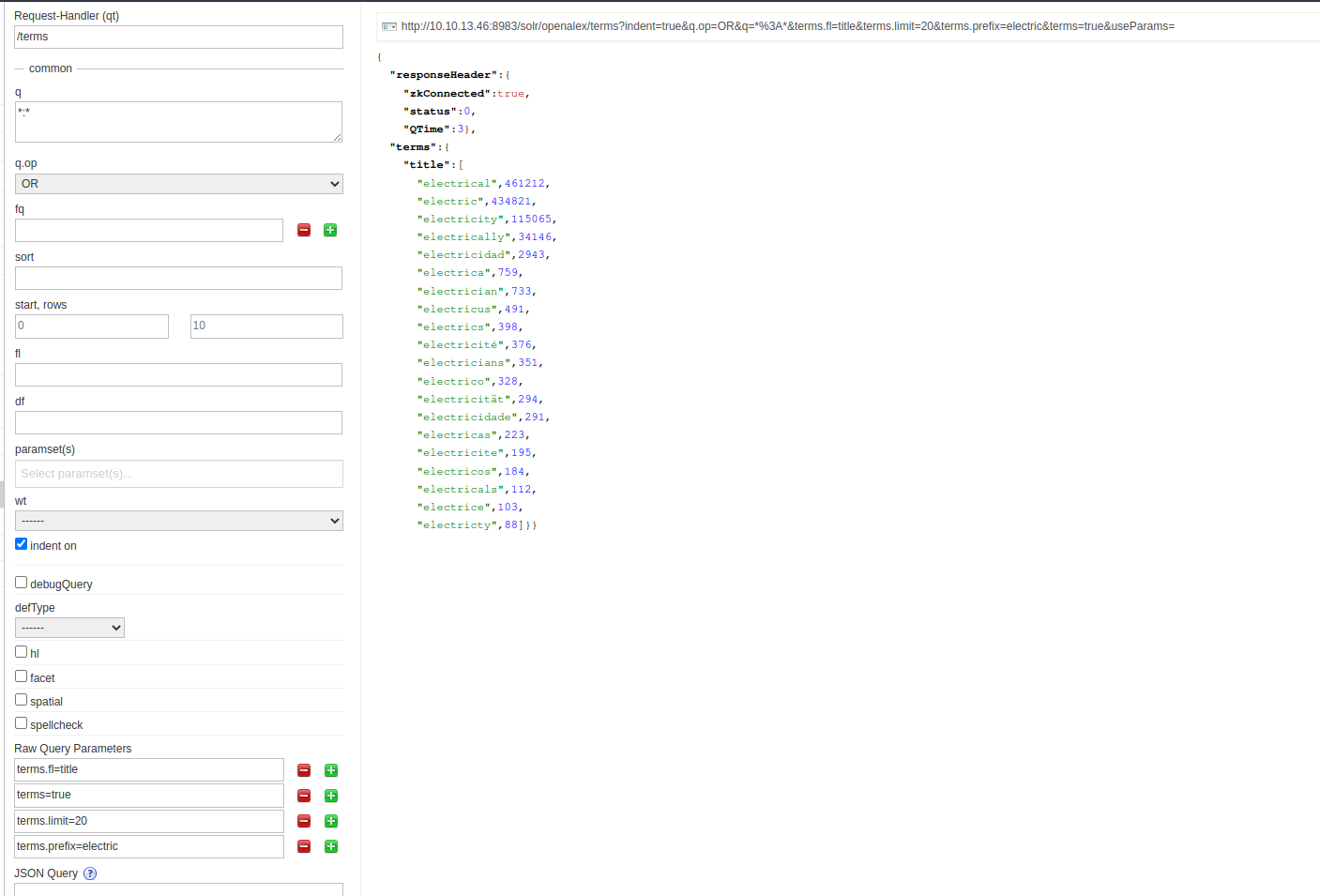
Click here to get the basic config