Priority screening
Last updated: 28/08/2026
Documentation incomplete
This is just a placeholder page with some notes. Please get in contact if you would be interested in properly documenting this section.
Background⚓︎
Priority screening is what allows users on NACSOS to save time in screening literature. Priority screening uses machine learning to predict the likely relevance of an item, given what users have already annotated. Together with a statistical stopping criterion, this allows users to stop screening without having seen all items, whilst assuring statistically that a certain recall is reached with a certain confidence. The stopping criterion used in NACSOS has been shown to be effective and safe.
It is best practice to start annotation randomly, heuristically using around 10% of the data set (depending on project size and characteristics). With the annotations in this random sample, the machine learning algorithm predicts the relevant items that are then ranked according to likelihood of relevance. These relevant items presented to the annotator first. The machine learning algorithm can then be retrained given the additional annotations, usually after annotating another couple of hundred items. The prevalence of relevant items in the prioritised set in the annotators screen will thus first go up and then usually decline. However, it regularly is the case that after a decline in prevalence, it increases again, as new clusters of relevant items are surfaced. This is especially the case when the initial random sample is small or otherwise not representative. It is important to note that the stopping criterion used by NACSOS has been shown to work through simulation. Other heuristic-based stopping rules, such as "stop after 50 consecutive excludes", often miss unseen clusters of relevant items.
Quick Start⚓︎
Step-by-step guide for priority screening run
-
Configure setup
- Within a project go Data Annotation -> Prioritisation (access to this section requires authorisation) and click button New prioritisation setup.
- Name the Prioritisation Setup.
- This might include the date and number of the model run.
- Example: “2024-10-29_round_01”
- Transfer all resolved and/or finished assignments from Unused label sources to Training data.
- The sequence of assignments is not important for the output of the model but it is important for making predictions about how much is left to scan (e.g. the stopping criterion).
- Model settings
- For Model choose either ‘SciBERT’ for a model trained on general scientific literature or ‘ClimateBERT’ for a model trained on climate literature.
- Keep Proportion for training and Number of training passes at default values if you do not know what these parameters do.
- For Number of predictions to keep specify a number depending on the size and number of assignments planned and the current stage of the project (note: keeping a large number might lead to low scores at the tail)
- NQL filter
- This specifies the set of documents used for training the model. For large projects with multiple imports, one might want to specify subsets, i.e., specific imports to use for training the model.
- If you want all of the scopes selected in training data to be used in the training, make sure your NQL query covers them.1
- If applying filter, specify a query of the form “import: import ID, import ID”
-
Verify inclusion rule and data table
- The inclusion rule specifies which annotation criteria are used in the training, so that items that are predicted to fit this rule can be prioritised.
- This takes the form of "[criteria]:[number specifying the value]"
- Example:
include:1takes all documents for the prediction that were included;sector:1 AND sector:15takes all documents that were assigned both sectors 1 and 15 (note: these numbers correspond to the keyboard shortcuts in the annotation process)- Adding
res |in front of the criterion means only taking inclusions from resolved assignment scopes.
- Adding
- One can check whether the inclusion rule was specified correctly in the preview table under 2) Verify data.
- This table should show either
trueorfalsefor the criteria specified in Inclusion rule.
- This table should show either
-
Initiate training and wait
- If all the above is specified, click Safe.
- Preliminary: send the Setup ID to a person who will run the model.
- Permissions can be granted such that a user can run the prioritisation themselves. For this, contact Tim.
- In this case, follow the button Initiate training under section 3) prioritisation results. This pre-fills relevant information for the run on gitlab.
- On the gitlab page, click New pipeline. After the automatic check has been completed, click the play button on the right hand side of prioritise in section perform. The prioritisation run can take a while to complete. Once it is complete, clean-up is automatic and once the run is finished, this prioritised run can be used to make assignments on NACSOS.
- An overview of the trained model is given in 3) Prioritisation results.
-
Once predictions are in, use in assignment config
 End-to-end workflow⚓︎
Setup config⚓︎
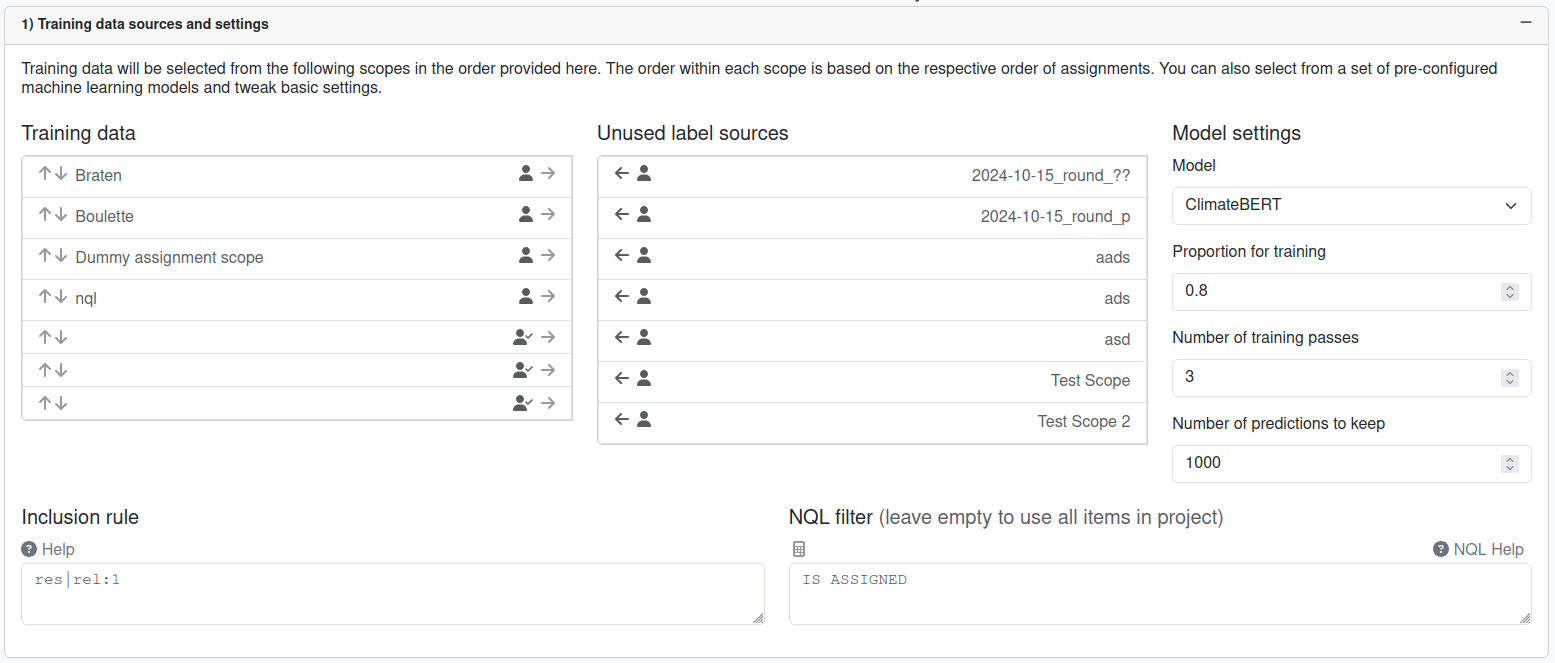
- when generating the data table, will write result from inclusion rule to column
incl_fieldand write predict data toincl_pred_field(keep unchanged unless this collides with other column names that might exist) train_splitproportion of the dataset to use for training (rest is for some basic evaluation; usually keep this as high as possible if you value potentially higher quality over higher quality certainty)n_predictionsremembering all predictions adds unnecessary burden on our database, so specify the smallest possible number (e.g. the number of assignments you are planning to make with the predictions)
Inclusion rule⚓︎
- based on columns
- note
NA OR 1is1andNA OR 0isNA(makes sense, but confusing at first) - note
NA AND 1isNAandNA AND 0is0(makes sense, but confusing at first) - general idea:
- list of column names means all should be True (if value available)
- add
!to column name to indicate value has to exist; implicitly assumingNA or 1which can be made explicit by adding? - prepend
~to column name to indicate negation of value (no effect on NA) - you might not care where a label comes from when at least one user chose it, then drop the first part of the column name (ANYSRC)
- add
*to ANYSRC to indicate that all should be 1 (e.g. all users agree) - note, this also always includes resolution, but that should implicitly be agreeing anyway
- lists can be enclosed in
[ .. ] - lists can be space- or comma-separated
- prepend bracketed list with
ANDorORto indicate how columns shall be combined - you can combine clauses with
ANDorOR - use
( .. )to combine multiple nested clauses - play with the grammar at https://www.lark-parser.org/ide/ (add
start: clauseto the beginning)
?clause: cols
       | clause _and  clause            -> and
       | clause _or  clause            -> or
       | "(" clause ")"
       | _neg clause                 -> not

cols: col [(("," | " ") col)*]  -> anded
    | "OR" "[" col [(("," | " ") col)*] "]"  -> ored
    | "AND" "[" col [(("," | " ") col)*] "]"  -> anded


col: SRC     -> maybeyes
   | SRC "!" -> forceyes
   | SRC "?" -> maybeyes
   | _neg SRC     -> maybeno
   | _neg SRC "!" -> forceno
   | _neg SRC "?" -> maybeno
   | ANYSRC  -> anyyes
   | ANYSRC "*" -> allyes
   | ANYSRC "!*" -> forceallyes
   | _neg ANYSRC  -> anyno
   | _neg ANYSRC "*" -> allno
   | _neg ANYSRC "!*" -> forceallno

SRC: LAB "|" LAB ":" DIGIT+
ANYSRC: LAB ":" DIGIT+
LAB: (LETTER|DIGIT|"-"|"_")+
_neg: "-" | "~"

_and: "AND"i | "&"
_or: "OR"i | "|"

%import common.DIGIT
%import common.LETTER
%import common.WS

%ignore WS
Data table⚓︎
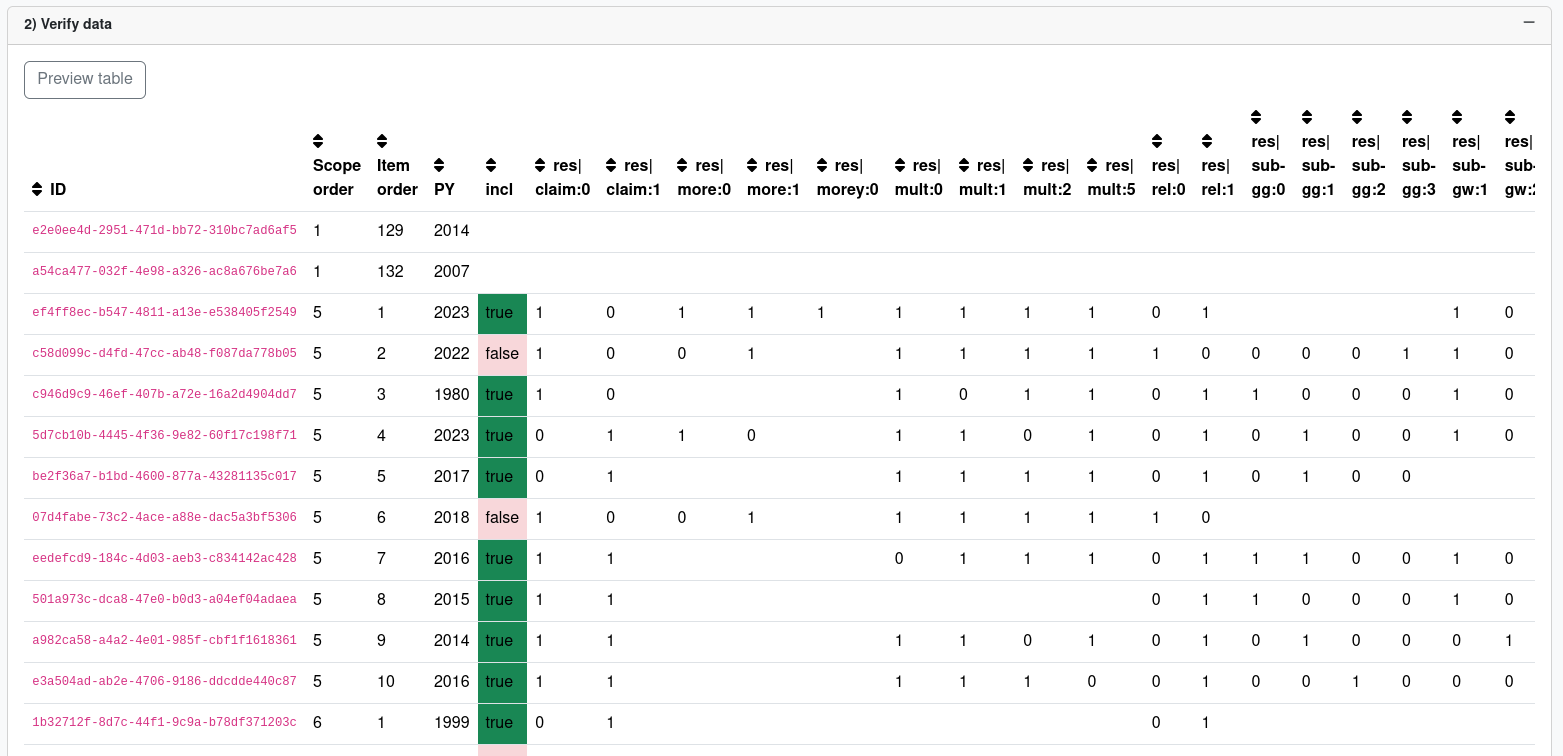
- basis for training date and predictions
- NQL defines total dataset (training and what you want to predict on)
- ignores hierarchy (if unclear, probably totally fine for you)
- when item appears in multiple selected scopes, all labels kept and assigned to first scope; some labels might be overridden (edge case where resolved multiple times)
- column name template
{res or username}|{label key}:{value}(whereasresis resolved) - table is only filled with
1s for selected label values and then populated with0s where it makes sense (e.g. assumemethod:0,method:1,method:2are all part of the "Methods" label and2was selected, then0and1should implicitly be0/False) - empty cells in table means no label available
- missing info propagates to inclusion rule
Training⚓︎
If you are not doing the training yourself, upon completing the configuration, send the Setup ID to a person who will run the model.
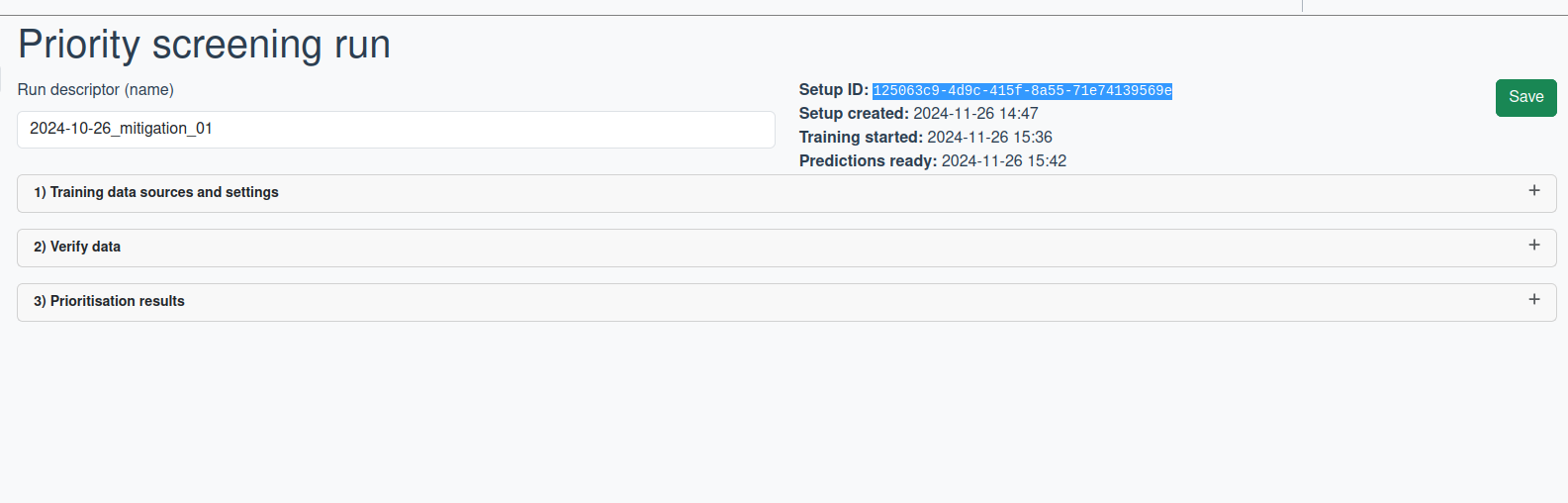
If you are training yourself, follow the steps below:
- Head over to gitlab (or follow the button)
- Create new pipeline
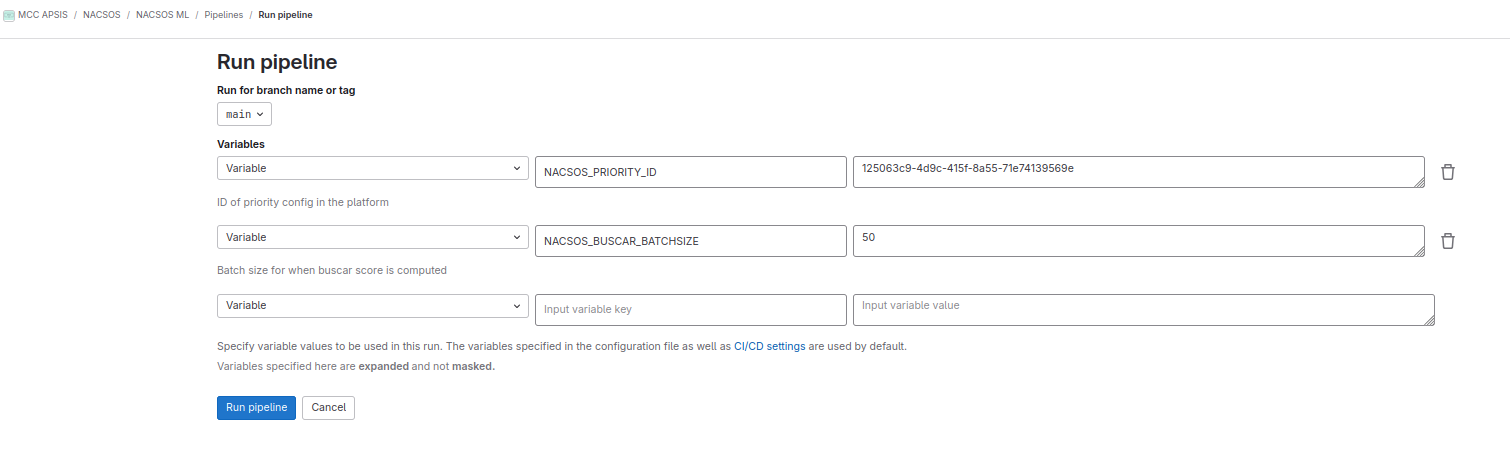
- Configure the variables (most importantly the ID, unless you know what you are doing, leave other variables untouched)
- Run pipeline (prioritise and cleanup; only run the other steps if you know what you are doing)
- Wait
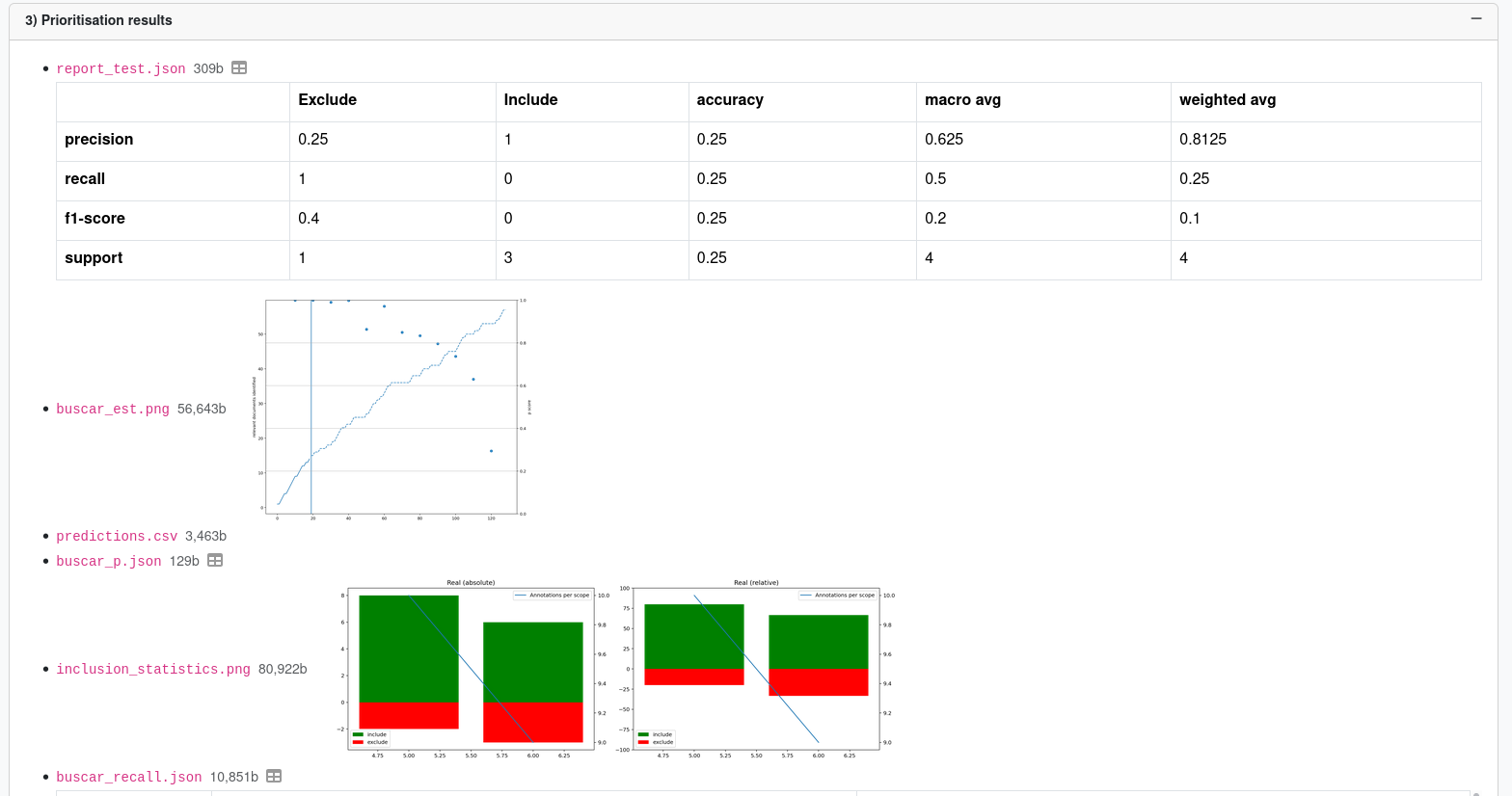
- Once training finishes, you can see results in NACSOS 3) Prioritisation results section (see screenshot below).
Important: Check that the computer has enough free resources for training
Check that the GPU is free (typically <40MB VRAM used) and there is enough main memory left (typically idle around 42/64GB) and the CPU isn't under load.
The first job of a new pipeline will dump the output of nvidia-smi and top (see example below). Primary, check the load average (system load avg over the last 1, 5 and 15 minutes) in the first line and the avail Mem at the bottom right of the top output. Loads under 1.0 and available memory over 20,000 are typically acceptable to start a prioritisation run.
% top -b -n1 | head -n5
top - 13:09:51 up 20 days, 18:22, 17 users,  load average: 0,29, 0,21, 0,16
Tasks: 411 total,   1 running, 410 sleeping,   0 stopped,   0 zombie
%Cpu(s):  0,6 us,  0,0 sy,  0,0 ni, 99,4 id,  0,0 wa,  0,0 hi,  0,0 si,  0,0 st
MiB Mem :  64210,2 total,   2785,7 free,  43024,1 used,  19219,0 buff/cache
MiB Swap:   2048,0 total,    103,5 free,   1944,5 used.  21186,1 avail Mem

% nvidia-smi
Tue Jul 21 13:10:31 2026
+-----------------------------------------------------------------------------------------+
| NVIDIA-SMI 595.71.05              Driver Version: 595.71.05      CUDA Version: 13.2     |
+-----------------------------------------+------------------------+----------------------+
| GPU  Name                 Persistence-M | Bus-Id          Disp.A | Volatile Uncorr. ECC |
| Fan  Temp   Perf          Pwr:Usage/Cap |           Memory-Usage | GPU-Util  Compute M. |
|                                         |                        |               MIG M. |
|=========================================+========================+======================|
|   0  NVIDIA GeForce RTX 3060        Off |   00000000:0B:00.0 Off |                  N/A |
|  0%   38C    P8             19W /  170W |      32MiB /  12288MiB |      0%      Default |
|                                         |                        |                  N/A |
+-----------------------------------------+------------------------+----------------------+
In the pipeline setup screen, you might want to change some of the default variables on target recall and confidence and the interval in which the stopping score is computed. Note, that reducing the batch size is extremely compute heavy. You rarely need a higher resolution than the default, only change it when you know exactly what this does.
End-to-end workflow when copying an existing priotity screening setup⚓︎
Training artifacts⚓︎
data.arrowFull dataset with all labels and predictions.buscar_est.pngBUSCAR score with number of relevant articles over time and estimation based on predictions on the rest.buscar_est.json... and the matching datainclusion_statistics.pngNumber of items and included/excluded items per assignment scope.inclusion_statistics.json... and the matching datareport_test.jsonpredictions.csvbuscar_p.jsonbuscar_recall.jsoninclusion_curve.pngbuscar.pngworkload_estimation.txtreport_self.jsonscore_distribution.pngroc_auc.pngroc_auc.json
Models⚓︎
SciBERT:
GitHub ,
Paper  ,
Model card
,
Model card 
ClimateBERT:
GitHub ,
Paper ,
Model card
-
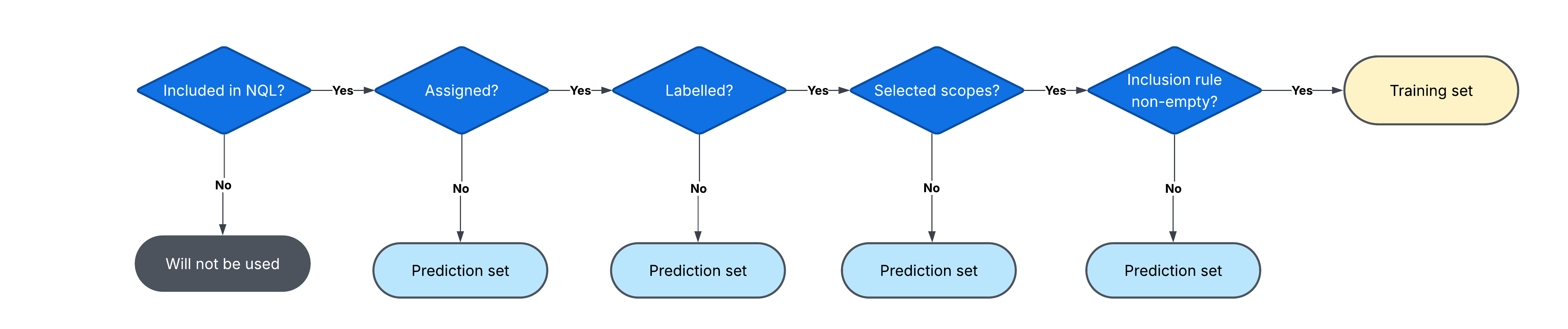
The data selected through NQL joined with training scopes will be filtered based on whether they have labels for inclusion rule. Items that do have labels will be included in the training set, and the rest of the NQL-selected data will be used as the prediction set from which prioritisations will come from. The default NQL statement is:
HAS ANNOTATION OR (IS NOT ASSIGNED AND HAS ABSTRACT > 50). The following Venn diagram demonstrates how this NQL statement intersects with training data.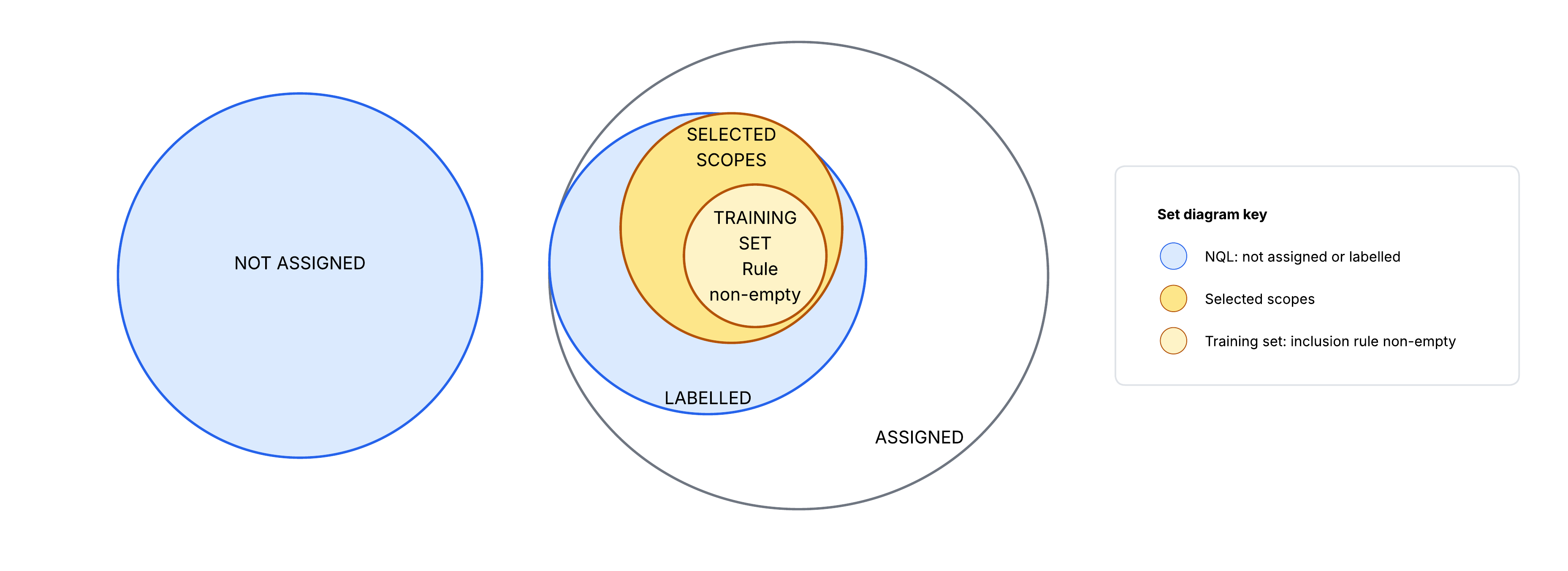
The folowing flow-chart diagram makes the training set inclusion clearer:
 ↩
↩